


如何手動合併拆分的 ZIP 壓縮包
如何開啟 Z01 文件
如何開啟haozip01.zip文件
如何停用自動資料傳送
如何在壓縮檔中加密檔名
如何從壓縮檔案中提取不包含子資料夾的文件
如何從 Windows 11 右鍵選單中移除 Bandizip 項目
如何手動合併拆分的 ZIP 壓縮包
Bandizip 的「修復壓縮檔」功能僅支援單一 ZIP 檔案。 如果您的損壞壓縮檔是拆分的 ZIP 壓縮檔,或者由於其他原因需要將拆分的 ZIP 壓縮檔合併為一個單獨的壓縮檔而無需重新壓縮,您可以使用簡單的命令手動合併拆分的 ZIP 壓縮檔。
1. 請檢查您的文件。
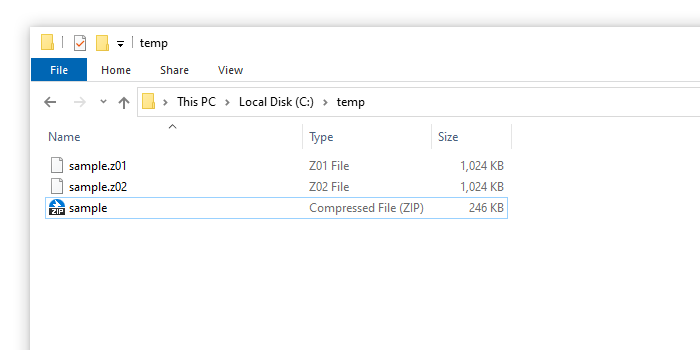
ZIP 格式的分割壓縮會建立副檔名為「z01」、「z02」…以及一個副檔名為「zip」的文件,如下所示。
2. 合併文件。
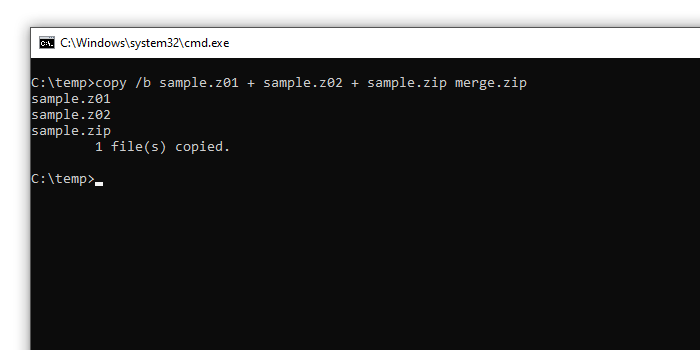
在文件所在位置開啟命令提示符,並執行以下命令。
copy /b sample.z01 + sample.z02 + sample.zip merge.zip
警告
請注意檔案名稱的輸入順序。 “zip”檔案必須放在最後。 由於輸入錯誤的命令可能會導致檔案損壞,因此請務必保留原始檔案的備份副本。3. 開啟合併後的壓縮檔。
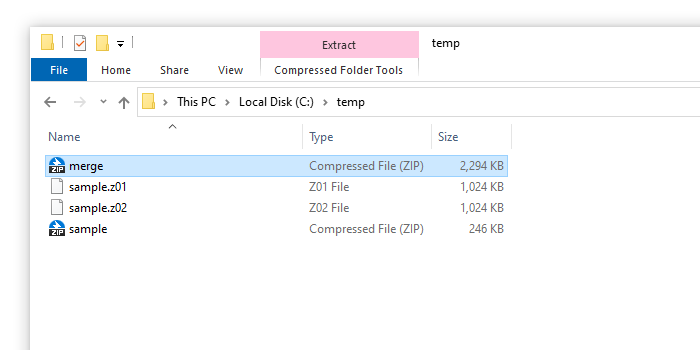
您可以看到已建立如下所示的「merge.zip」壓縮檔。 您可以開啟合併後的壓縮檔或開始修復檔案。
警告
透過此方法合併的壓縮檔可能無法打開,或者可能會顯示錯誤訊息。