


如何手動合併拆分的 ZIP 壓縮包
如何開啟 Z01 文件
如何開啟haozip01.zip文件
如何停用自動資料傳送
如何在壓縮檔中加密檔名
如何從壓縮檔案中提取不包含子資料夾的文件
如何從 Windows 11 右鍵選單中移除 Bandizip 項目
如何從壓縮檔案中提取不包含子資料夾的文件
您可能會發現,當您解壓縮一個包含檔案且每個檔案都位於單獨的子資料夾中的檔案時(如下所示),子資料夾的結構得以保留,並且提取的檔案也組織在相同的子資料夾中。
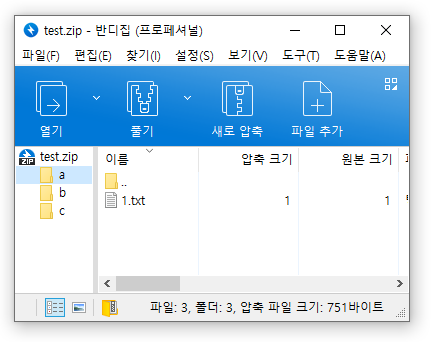
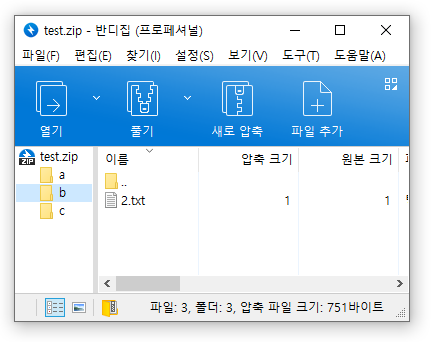
但有時,您可能希望忽略子資料夾,將壓縮包中的所有檔案提取出來,並將它們放在一個資料夾中。在這種情況下,請執行下列步驟。
使用 Bandizip 的「尋找檔案」功能
- 使用 Bandizip 開啟壓縮文件
- 按 Ctrl+F 開啟「尋找檔案」視窗。
- 選擇要提取的檔案。
- 點擊「提取」按鈕或將選定的檔案拖曳到目標資料夾。
使用命令列參數
使用如下所示的命令“e”。
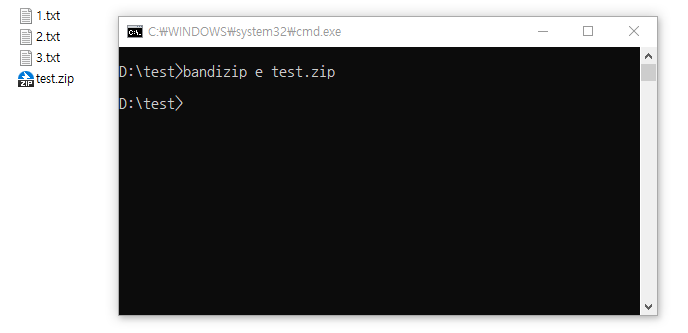
請訪問以下鏈接,以了解更多關於如何使用 Bandizip 命令列參數的資訊。
說明 » 命令列參數