
如何解決 Microsoft Edge 中出現的「…已被阻止,因為此類檔案可能會損害您的裝置。」問題
如何在工作管理員中顯示命令列
如何在 Windows 10 和 11 中變更檔案關聯
檔案名稱以 ._ 開頭的檔案是什麼?
如何解決 WebP 檔案縮圖在檔案總管中不顯示的問題
如何在 Windows 11 中開啟 Internet 屬性(Internet 選項)
如何在工作管理員中建立轉儲文件
如何解決 Windows 11 22H2 中上下文功能表無法正常運作的問題
如何排查 AppX 套件安裝失敗的問題
如何解決錯誤代碼:XX-12157
如何安裝 WebView2
如何在檔案總管中刪除縮圖緩存
Bandisoft 使用的域名
如何解決錯誤代碼:XX-12157
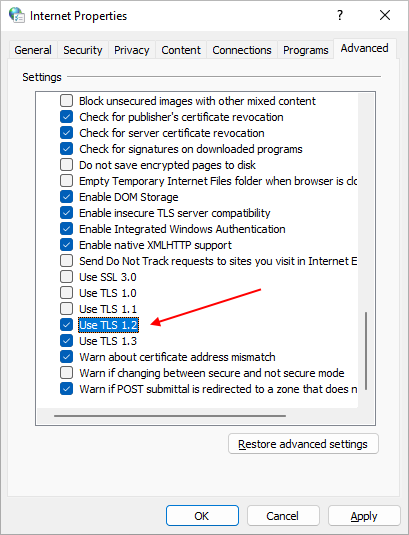
如果您的網絡瀏覽器使用較舊版本的TLS協議,可能在激活Bandisoft的軟件或使用其中某些功能時出現問題。 如果您從軟件收到錯誤代碼:0xbad70006-12157(或以12157結尾的任何其他錯誤代碼),請按照以下步驟在瀏覽器中啟用TLS 1.2協議,然後重試。
- 打開Internet屬性。
- 選擇“高級”選項卡。
- 啟用“使用TLS 1.2”。